How to Use TikTok Shop's Content Authorization Tool: Separate Permission, Violation Resolution, and Appeals
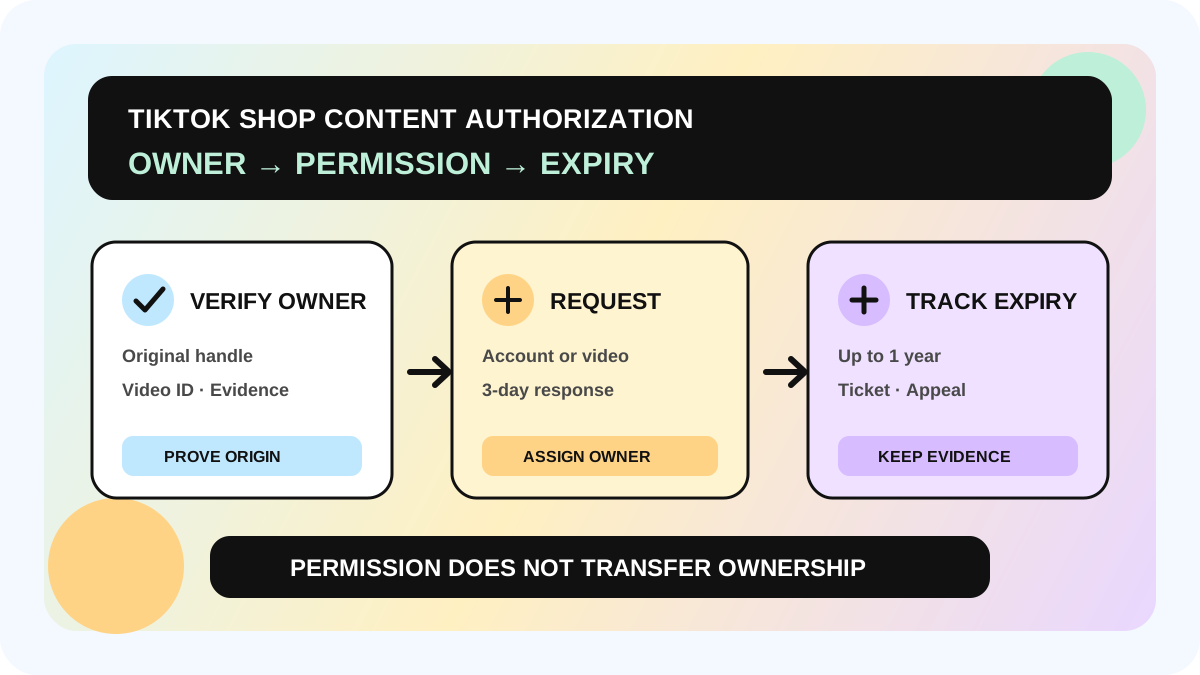
TikTok Shop released its Content Authorization Tool on October 7, 2026, allowing creators to request or grant permission between TikTok accounts. It offers two paths: account-level authorization from the Creator Health Rating (CHR) page, and video-level authorization from an eligible Unoriginal or Pirated Content violation ticket. The first question is not “Can I click authorize?” It is “Who created this content, was permission already agreed, and are we managing an ongoing collaboration or one enforcement case?”
This guide uses official US TikTok Shop material. Availability, request limits, controls, and enforcement outcomes can vary by market, account, and later product updates. Verify the live creator interface, the underlying agreement, and local law. If ownership is disputed, pause reuse and route the case to a qualified human reviewer.
Direct answer: account-level, video-level, or appeal?
| Situation | Entry point | Best fit | Critical timing |
|---|---|---|---|
| Account-level authorization | Content Authorization Tool on the CHR page | Ongoing, explicit permission between two creator accounts | Starts from submission; generally up to one year; unanswered requests auto-decline after three days |
| Video-level authorization | Eligible violation-ticket details | One video used with the original owner's permission receives an unoriginal/pirated-content violation | Submit before the appeal window closes; authorization does not extend it |
| Appeal | CHR → Violations → Appeal | You created the original, or believe enforcement was a mistake | TikTok's appeal guide generally requires submission within 30 days of notice |
The original owner must approve the request. The tool does not copy, repost, or publish a video, transfer ownership, allow sublicensing, or change creator commission. A team should track platform authorization, contractual usage rights, and commercial terms as separate records.
Who needs this workflow—and where does it stop?
It fits creator networks, MCNs, brands, and TikTok Shop teams that reuse approved creative across related creator accounts. Account-level authorization can document an ongoing relationship; video-level authorization can confirm permission when one eligible video is already under review.
It is not a “reuse now, ask later” loophole. It cannot fix unknown provenance, disputed joint authorship, missing music, trademark or likeness rights, or a contract that never covered the use. A TikTok decision addresses a platform state; it does not guarantee the same result in court, on another platform, or in another market.
A five-step permission-to-resolution workflow
1. Build the ownership record before publication
Save the original creator handle, original video ID, raw footage, script, agreement, permitted accounts, channels, territories, and end date. Connect the record to the creator content strategy framework so production does not end with a final export and no proof of provenance.
2. Choose authorization by scope
Use the CHR tool for an ongoing, defined account relationship. TikTok says one creator may authorize up to five other creator accounts at account level, generally for no more than one year. Use the eligible ticket path for one enforced video and identify the original owner by handle.
Account-level permission is not an unlimited content library. Save both handles, scope, start and end dates, approval evidence, and the contract basis. If the same post is commercial content, complete the separate commercial-content disclosure and Brand Partner workflow.
3. Turn the three-day response into an owned task
Each request remains valid for three days; no response means automatic decline. The owner receives a “Request to reuse your video” notice in TikTok Shop Inbox and must Accept or Decline. Notify them when the request is sent and set a day-two reminder.
TikTok also applies request limits and repeated-decline controls. Its page says two declines from the same owner within 30 days, or declines from five different owners within 30 days, can block new requests for 30 days. Confirm permission off-platform first instead of treating the system as a cold-outreach tool.
4. Choose authorization or appeal based on the fact pattern
Use Request Authorization when another creator owns the original and you had permission. Use Appeal when you created the original or believe the detection or enforcement was wrong. An authorization request does not extend the appeal window, so record the ticket deadline independently.
Do not delete or private the affected video while a violation-related request is under review; doing so can remove both options. TikTok's page contains inconsistent wording about whether appeal and authorization may be reviewed simultaneously. Follow the live ticket controls or TikTok support for the specific case instead of assuming both paths can run in parallel.
5. Verify the result and the continuing boundary
Approval may revoke the related violation and lift enforcement on the video; it is not a guaranteed outcome for every case. Save the decision, expiry, and final ticket status, then route the asset through the content review and publishing handoff. Stop further reuse when permission expires, is withdrawn, the account changes, or the contract ends.
Publishing and exception checklist
- [ ] Original owner and original video ID are verified
- [ ] Contract states accounts, assets, channels, territories, and term
- [ ] Account-level authorization, video-level authorization, and appeal are not confused
- [ ] One owner follows up within the three-day request window
- [ ] Enforced video stays public and the ticket deadline is recorded
- [ ] Approval, expiry, screenshots, and contract evidence are searchable
- [ ] Commission, commercial disclosure, and ads rights are tracked separately
- [ ] Disputed ownership or legal uncertainty is paused for human review
The allymatic view: authorization is an expiring evidence chain
A creator workflow should store original owner, authorized account, content/video scope, request status, decision time, expiry, and evidence link. That prevents BD from treating a verbal yes as platform approval and prevents content teams from treating platform approval as an ownership buyout.
Audit the last 20 reused videos. Flag any item without an original owner, defined scope, or expiry, then assign owners and reminders in the creator marketing management system. Automation can track the record; it cannot decide ownership.
FAQ
Do I own the original video after authorization?
No. TikTok says authorization does not transfer ownership, and permission cannot be sublicensed to another creator.
What if the owner does not respond in three days?
The request is automatically declined. For a violation-ticket request, appeal eligibility depends on the ticket status and the remaining appeal window.
Does authorization change affiliate commission?
No. TikTok says the tool does not change how commission is calculated or paid; commercial terms remain between creator and seller.
Why is Request Authorization missing?
The violation may be ineligible, another request may be pending, the action window may be closed, the video may be deleted/private, the daily limit may be reached, or repeated declines may have temporarily restricted access.
Official Sources
Official Sources
Primary references used for this article.